
Top Office Chairs for Sciatica Relief
You’re probably here because that nagging pain in your lower back, buttock, or leg isn’t just a nuisance – it’s full-blown sciatica. And if you spend a good chunk of your day at a desk, you know just how much the wrong office chair can amplify that discomfort. Good news: you don’t have to suffer in silence. Finding the right office chair can be a game-changer for sciatica relief.
This isn’t about buying the most expensive chair; it’s about understanding what makes a chair truly supportive for your sciatic nerve and then finding the best fit for your budget and needs. We’ll break down the science, explore key features, and guide you through some of the top contenders that can help you finally sit comfortably again.
Understanding Sciatica and How Your Chair Plays a Role
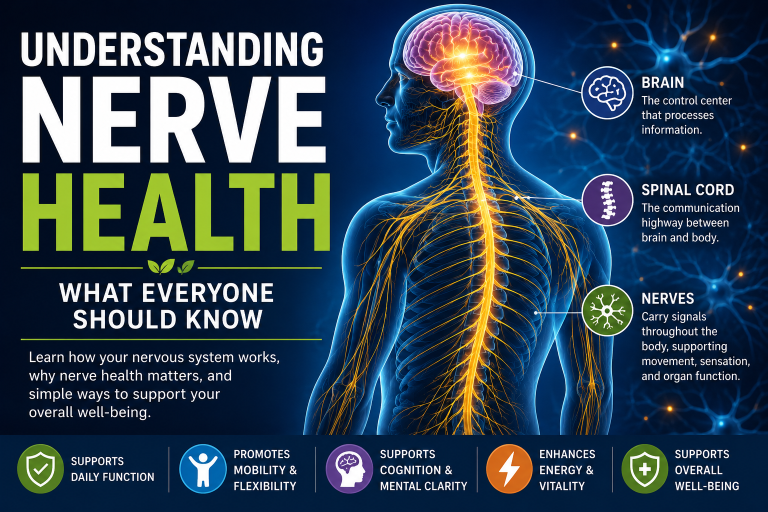
Before diving into chair recommendations, let’s quickly touch on sciatica itself. It’s not a condition; it’s a symptom. Sciatica occurs when your sciatic nerve, the longest and widest nerve in your body, gets compressed or irritated. This usually happens in the lower back, often due to a herniated disc, spinal stenosis, or piriformis syndrome. The result? Pain, tingling, numbness, or weakness that radiates from your lower back down one leg.
Your office chair, whether you realize it or not, has a profound impact on your spine’s alignment and the pressure on your sciatic nerve. A poorly designed chair can:
- Promote slouching: This rounds your lower back, putting undue pressure on spinal discs.
- Lack proper lumbar support: Without this, your natural lumbar curve flattens, straining the nerve.
- Create pressure points: Hard edges or unyielding seats can compress nerves and blood vessels in your buttocks and thighs.
- Restrict movement: Remaining in a static, uncomfortable position for hours contributes to stiffness and pain.
Conversely, a well-designed office chair for sciatica relief can:
- Maintain natural spinal alignment: Supporting your lower back in its natural curve.
- Distribute weight evenly: Reducing pressure on specific points.
- Encourage micro-movements: Keeping your body engaged and preventing stiffness.
- Promote good posture: Making it easier to sit correctly without conscious effort.
This holistic approach to sitting is critical for managing and reducing your sciatic pain.
If you’re struggling with sciatica and looking for relief while working, choosing the right office chair is crucial. A supportive chair can make a significant difference in your comfort and productivity. For more insights on managing sciatica, you might find it helpful to read the article on the duration of sciatica symptoms, which explores how long this condition can last and offers tips for relief. You can check it out here: How Long Does Sciatica Last?.
Key Features to Look for in an Office Chair for Sciatica Relief
When you’re on the hunt for a chair, don’t just look at the price tag or how “futuristic” it appears. Focus on these non-negotiable features that are crucial for sciatica relief.
Adjustable Lumbar Support
This is arguably the most vital feature. Your lower back has a natural, inward curve (the lumbar lordosis). A good chair will help maintain this curve.
- Height and Depth Adjustability: This allows you to position the support exactly where your lumbar curve needs it. Some chairs offer dynamic lumbar support that flexes with your movement.
- Firmness Control: The ability to increase or decrease the firmness of the lumbar support ensures it’s comfortable for your specific spinal shape.
Without proper lumbar support, your spine tends to flatten, putting stress on your discs and potentially compressing the sciatic nerve.
Seat Depth and Waterfall Edge
The seat of your chair is where much of the pressure is distributed, and it needs to be just right.
- Adjustable Seat Depth: You should be able to sit with your back against the backrest and have about 2-4 fingers’ width between the edge of the seat and the back of your knees. This ensures your weight is properly distributed and avoids cutting off circulation or putting pressure on the back of your thighs, where the sciatic nerve runs.
- Waterfall Edge: Look for a seat with a gently sloping front edge. This “waterfall” design reduces pressure on the back of your thighs, promoting better circulation and decreasing the likelihood of nerve compression.
Materials and Cushioning: Not All Padding Is Equal
While plush cushioning might feel good initially, it can bottom out quickly, leading to increased pressure points.
- High-Density Foam: This type of foam provides firm, consistent support that won’t flatten over time. It cradles your body without letting you sink too deeply.
- Memory Foam (with caution): While it conforms to your body, some memory foams can retain heat and may not offer sufficient firmness for sustained support. Look for high-density, breathable memory foam if you opt for this.
- Mesh: For the backrest, mesh can be excellent for breathability, preventing sweat buildup. However, for the seat, mesh needs to be supportive enough not to create pressure points. Some higher-end chairs use elasticized mesh that provides surprising support and good pressure distribution.
Armrests: Adjustable and Supportive
Often overlooked, good armrests can significantly impact your posture and sciatica relief.
- Height, Depth, and Pivot Adjustability (3D or 4D): This allows you to position your arms so your shoulders are relaxed and your elbows are at a 90-degree angle. This reduces tension in your shoulders and upper back, which can indirectly contribute to lower back pain.
- Soft, Padded Surface: Hard plastic armrests can be uncomfortable and cause pressure points on your forearms.
Properly adjusted armrests take the strain off your neck and shoulders, preventing slouching and promoting a more upright, healthy posture which benefits your entire spine.
Recline and Tilt Mechanisms
Being able to change your sitting position is crucial for reducing static load on your spine.
- Synchronous Tilt: This mechanism allows the backrest and seat to recline simultaneously, with the seat tilting slightly less than the back. It maintains a consistent back angle relative to your hips, which is excellent for maintaining lumbar support even when leaning back.
- Locking Mechanism: You should be able to lock the chair in various reclined positions based on your comfort and task.
- Tilt Tension Control: This lets you adjust the resistance of the recline, so you don’t feel like you’re falling backward or straining to lean back.
Changing your posture throughout the day encourages blood flow and prevents stiffness, both essential for sciatica relief.
Top Office Chairs for Sciatica Relief: Our Expert Picks
Now that you know what to look for, let’s explore some of the best office chairs designed with your comfort and sciatica relief in mind. Remember, what works for one person might not work for another, so consider these as excellent starting points.
Herman Miller Aeron: The Ergonomic Icon
The Aeron isn’t just a chair; it’s a statement in ergonomic design. Its revolutionary Pellicle mesh material distributes pressure evenly across your body, virtually eliminating pressure points.
- Key Features:
- PostureFit SL: Provides unparalleled adjustable sacral and lumbar support, conforming to your natural spinal curve.
- Harmonic Tilt: Allows for smooth, natural reclining, supporting a wide range of movements.
- 8Z Pellicle Suspension: Eight zones of varying tension provide tailored support where you need it most, promoting even weight distribution.
- Three Sizes (A, B, C): Ensures a precise fit for different body types, a crucial aspect often overlooked.
- Why it’s great for sciatica: The Aeron’s unique mesh design and adaptive lumbar support reduce pressure on the sciatic nerve by promoting excellent posture and even weight distribution. Its ability to adapt to your movements and provide custom support makes it a top contender for long-term sciatica relief.
- Considerations: It’s an investment, but many users attest to its durability and effectiveness. The mesh itself needs to be cleaned periodically.
Steelcase Gesture: Designed for Modern Workflows
The Steelcase Gesture was designed around the movement of the human body, specifically how we interact with technology. Its “360-degree arm” is particularly innovative.
- Key Features:
- Core Equalizer and Back with Lumbar Support: Flexes and supports your spine as you move, ensuring continuous lumbar support in any position.
- Seat with Adaptive Bolstering: The seat edge flexes to reduce pressure behind the thighs, and the foam conforms to your body.
- 360 Arm: Unprecedented adjustability in the armrests, allowing you to find the perfect support for various postures and tech devices.
- Why it’s great for sciatica: The Gesture’s ability to support dynamic movement means you’re encouraged to shift positions, which is excellent for preventing static pressure on your sciatic nerve. The superior armrest adjustability also reduces strain throughout your upper body, promoting better overall spinal alignment.
- Considerations: Another premium option, but its adaptability makes it suitable for diverse sitting needs and body types.
Haworth Zody: Blending Support and Customization
The Zody stands out for its high degree of adjustability, particularly its asymmetrical lumbar support.
- Key Features:
- Asymmetrical Lumbar Support: This allows you to provide different levels of support to the right and left sides of your lower back, addressing specific imbalances or areas of pain.
- Passive Pelvic Support: Helps to stabilize your pelvis, which is fundamental for proper spinal alignment.
- Multiple Adjustments: From seat depth to armrest width and height, the Zody allows for extensive customization.
- Why it’s great for sciatica: The asymmetrical lumbar support is a unique feature that can be particularly beneficial if your sciatica is predominantly on one side. By targeting specific areas of the lumbar spine, it can offer tailored sciatica relief.
- Considerations: The sheer number of adjustments might feel overwhelming initially, but it provides a truly customized feel once set up.
Secretlab TITAN Evo: Gaming Chair Meets Ergonomics
While often associated with gaming, the TITAN Evo series from Secretlab incorporates significant ergonomic features that make it a surprisingly good option for sciatica relief, especially for those who prefer the aesthetics of a racing-style chair.
- Key Features:
- L-ADAPT Lumbar Support System: A 4-way internal lumbar support that can be adjusted both vertically and horizontally, providing exceptional lower back customization.
- Pebble seat base: A redesigned seat base with a gentle curve, improving pressure distribution and reducing strain on the back of the legs.
- Full-metal 4D Armrests: Highly adjustable for height, tilt, and rotation.
- Choice of Material: Offers NEO Hybrid Leatherette, SoftWeave® Plus Fabric, or NAPA Leather, allowing for personal preference in feel and breathability.
- Why it’s great for sciatica: The L-ADAPT lumbar system is a standout, offering a level of fine-tuning for your lower back typically found only in higher-end office chairs. This, combined with the carefully designed seat base, offers surprisingly effective sciatica relief for many users.
- Considerations: The aesthetic might not appeal to everyone, and some may find the side bolsters on the seat and back restrictive compared to traditional office chairs.
Serta Ergonomic Executive Office Chair: Budget-Friendly Support
If premium chairs are out of your budget, the Serta Ergonomic Executive Chair offers a surprising amount of support and comfort for its price point.
- Key Features:
- Deep Layered Body Pillows: Provides cushioned support, though not as dense as high-end foams.
- Adjustable Lumbar Support: While not as sophisticated as Herman Miller or Steelcase, it offers pneumatic adjustment to the lumbar area.
- Pneumatic Lift with Tilt and Tension Control: Allows for basic height, recline, and tilt resistance adjustments.
- Why it’s great for sciatica: For its price, it provides a decent level of lower back support that can be effective for managing mild to moderate sciatic pain. The plush padding can be comfortable for shorter periods, and the adjustable lumbar helps to some degree.
- Considerations: While comfortable, it won’t offer the same level of long-term support and adjustability as more expensive ergonomic chairs. The cushioning may compress more over time. It’s a good entry-level option but might require more frequent position changes to prevent stiffness.
Beyond the Chair: Integrated Strategies for Sciatica Relief
Remember, even the best office chair is just one piece of the puzzle for sciatica relief. Your overall lifestyle, movement habits, and even your desk setup play equally important roles.
Ergonomic Workstation Setup
Your chair is only as good as its surroundings. Make sure the rest of your workstation supports a pain-free posture.
- Monitor Height: The top of your monitor should be at eye level, so you’re not craning your neck up or down.
- Keyboard and Mouse Positioning: Keep them close to your body to avoid reaching, which can strain your shoulders and back. Consider an ergonomic keyboard and mouse.
- Footrest: If your feet don’t comfortably rest flat on the floor with your knees at a 90-degree angle (or slightly open), use an adjustable footrest. This is crucial for maintaining proper pelvic tilt.
- Stand-Sit Desk: Alternating between sitting and standing is one of the most effective strategies for preventing and alleviating back pain. A standing desk encourages movement and reduces prolonged pressure on your spine.
Daily Exercises & Stretches
Movement is medicine for sciatica. Incorporate these simple exercises and stretches into your daily routine.
- Pelvic Tilts: Lie on your back with knees bent, feet flat. Gently flatten your lower back against the floor, engaging your abdominal muscles. Hold for a few seconds, then release.
- Knee-to-Chest Stretch: Lie on your back, bring one knee towards your chest, holding it with both hands. Hold for 20-30 seconds. Repeat with the other leg. You can also do both knees simultaneously.
- Piriformis Stretch: While lying on your back, cross one ankle over the opposite knee. Gently pull the bottom knee towards your chest until you feel a stretch in your glute/hip.
- Cat-Cow Stretch: On hands and knees, arch your back like a cat, then drop your belly and raise your head like a cow. This gently mobilizes your spine.
- Walking: Even a short, brisk walk every hour or two can do wonders for blood circulation and spinal health.
Lifestyle and Nutrition Tips
What you put into your body and how you live can also influence your pain levels.
- Stay Hydrated: Water is vital for disc health. Dehydrated discs can be less resilient.
- Anti-Inflammatory Diet: Incorporate foods rich in omega-3 fatty acids (fatty fish, flaxseed), antioxidants (fruits and vegetables), and lean proteins. Limit processed foods, excessive sugar, and unhealthy fats, which can contribute to inflammation.
- Manage Stress: Stress can increase muscle tension, exacerbating sciatic pain. Practice mindfulness, meditation, or deep breathing exercises.
- Maintain a Healthy Weight: Excess weight puts additional strain on your spine.
- Quit Smoking: Smoking reduces blood flow to spinal tissues, hindering healing.
Supplements to Consider (Always Consult Your Doctor)
While not a magic bullet, some supplements may offer additional support.
- Magnesium: Can help relax muscles and reduce nerve pain.
- Turmeric/Curcumin: Known for its potent anti-inflammatory properties.
- Alpha-Lipoic Acid: An antioxidant that may help with nerve pain.
- Vitamin D: Important for bone health and can influence pain perception.
Always discuss any supplements with your doctor before starting them, especially if you have existing medical conditions or are taking other medications.
If you’re struggling with sciatica and looking for relief while working, finding the right office chair is essential. A well-designed chair can help alleviate discomfort and improve your posture throughout the day. For more insights on this topic, you might find it helpful to read a related article that discusses the best office chairs specifically tailored for sciatica relief. You can check it out here for more information on how to choose the perfect chair for your needs.
Conclusion: Your Path to Lasting Sciatica Relief
Finding the perfect office chair for sciatica relief is a journey, not a destination. It involves understanding your body’s needs, identifying key ergonomic features, and integrating the chair into a broader strategy for wellness. The chairs we’ve highlighted offer excellent starting points, but your personal preference and specific pain points should guide your final decision.
Remember, consistency is key. Even the best chair won’t eliminate pain if you sit immobile for hours on end, neglect exercise, or have a poor overall ergonomic setup. By investing in a quality chair and adopting healthy habits, you can significantly reduce your sciatic pain and reclaim comfort in your workday.
Don’t let sciatica dictate your day. Take control, make informed choices, and experience the profound difference the right support can make. For more in-depth articles on managing sciatic pain and product recommendations, explore SciaticNervePainRelief.shop.
Frequently Asked Questions (FAQs)
1. What exactly is sciatica, and how can an office chair help?
Sciatica is pain that radiates along the path of the sciatic nerve, which branches from your lower back through your hips and buttocks and down each leg. It usually occurs when a herniated disc, bone spur on the spine, or narrowing of the spine (spinal stenosis) compresses part of the nerve. An office chair helps by providing proper lumbar support, promoting good spinal alignment, distributing weight evenly, and encouraging dynamic movement, all of which reduce pressure on the sciatic nerve.
2. Is a firm or soft chair better for sciatica?
Generally, a chair with firm, high-density cushioning is better than a soft, plush one for sciatica relief. While soft chairs feel comfortable initially, they often lack sufficient support and can cause you to sink, leading to poor posture and increased pressure points over time. Firmer support helps maintain your spinal curves and distributes weight more effectively.
3. How often should I get up and move when I have sciatica?
Even with the best chair, prolonged sitting is detrimental. Aim to stand up, stretch, and walk for at least 5-10 minutes every hour. Better yet, consider a sit-stand desk that allows you to alternate between sitting and standing throughout the day, preventing stiffness and reducing constant pressure on your lower back.
4. Can an ergonomic chair completely cure my sciatica?
While an ergonomic chair can significantly alleviate and manage sciatica symptoms, it is generally not a cure. Sciatica often has underlying causes (like a herniated disc) that may require medical intervention, physical therapy, or other treatments. An ergonomic chair is a crucial tool in a comprehensive management plan for sciatica relief.
5. What’s the ideal sitting posture for someone with sciatica?
The ideal sitting posture involves:
- Sitting with your back firmly against the backrest, maintaining the natural curve of your lower back (supported by lumbar support).
- Keeping your feet flat on the floor (or on a footrest) with your knees at or slightly below hip level, forming about a 90-degree angle.
- Having your shoulders relaxed and elbows close to your body, bent at about a 90-degree angle when typing.
- Avoiding crossing your legs, which can compress nerves and restrict circulation.
6. Are gaming chairs good for sciatica?
Some high-quality gaming chairs, like the Secretlab TITAN Evo, have integrated advanced ergonomic features, particularly excellent adjustable lumbar support, making them surprisingly effective for sciatica relief. However, many entry-level gaming chairs prioritize aesthetics over true ergonomics, so it’s important to evaluate them based on the same key features (lumbar support, seat depth, adjustability) as traditional office chairs.
7. If I can’t afford an expensive ergonomic chair, what’s my best alternative for sciatica relief?
If a new chair isn’t an option, you can significantly improve an existing chair:
- Add an ergonomic lumbar support cushion: Choose one that fits your lumbar curve and provides firm support.
- Use a seat cushion: A wedge cushion or a memory foam cushion can help distribute pressure and improve pelvic tilt.
- Ensure proper feet placement: Use a stack of books or a box as a temporary footrest if your feet don’t reach the floor.
- Focus on movement: Get up and move more frequently, even if briefly. These inexpensive adjustments can go a long way in providing temporary sciatica relief.
FAQs
What is sciatica and how does it relate to office chairs?
Sciatica is a condition characterized by pain that radiates along the path of the sciatic nerve, which runs from your lower back through your hips and buttocks and down each leg. Sitting for long periods in an uncomfortable or unsupportive office chair can exacerbate sciatica symptoms, making it important to choose a chair that provides proper support and comfort.
What features should I look for in an office chair to help with sciatica?
When selecting an office chair for sciatica, it’s important to look for features such as lumbar support, adjustable seat height and depth, adjustable armrests, and a seat with proper cushioning. These features can help alleviate pressure on the lower back and promote better posture, which can in turn reduce sciatica symptoms.
Are there specific types of office chairs that are recommended for individuals with sciatica?
Ergonomic office chairs are often recommended for individuals with sciatica, as they are designed to provide proper support and promote good posture. Chairs with adjustable lumbar support, a recline feature, and a seat with ample cushioning are particularly beneficial for those with sciatica.
How can I ensure that the office chair I choose will be effective for managing sciatica symptoms?
Before purchasing an office chair for sciatica, it’s important to test it out if possible. Look for chairs that provide adequate lumbar support and allow for adjustments to fit your specific body shape and size. Additionally, reading reviews and seeking recommendations from healthcare professionals can help ensure that the chair you choose will be effective for managing sciatica symptoms.
Are there any additional tips for managing sciatica while sitting in an office chair?
In addition to choosing a supportive office chair, individuals with sciatica can benefit from taking regular breaks to stand, stretch, and walk around. Using a footrest to elevate the feet slightly can also help reduce pressure on the lower back. It’s important to maintain good posture while sitting and to listen to your body’s signals to avoid exacerbating sciatica symptoms.